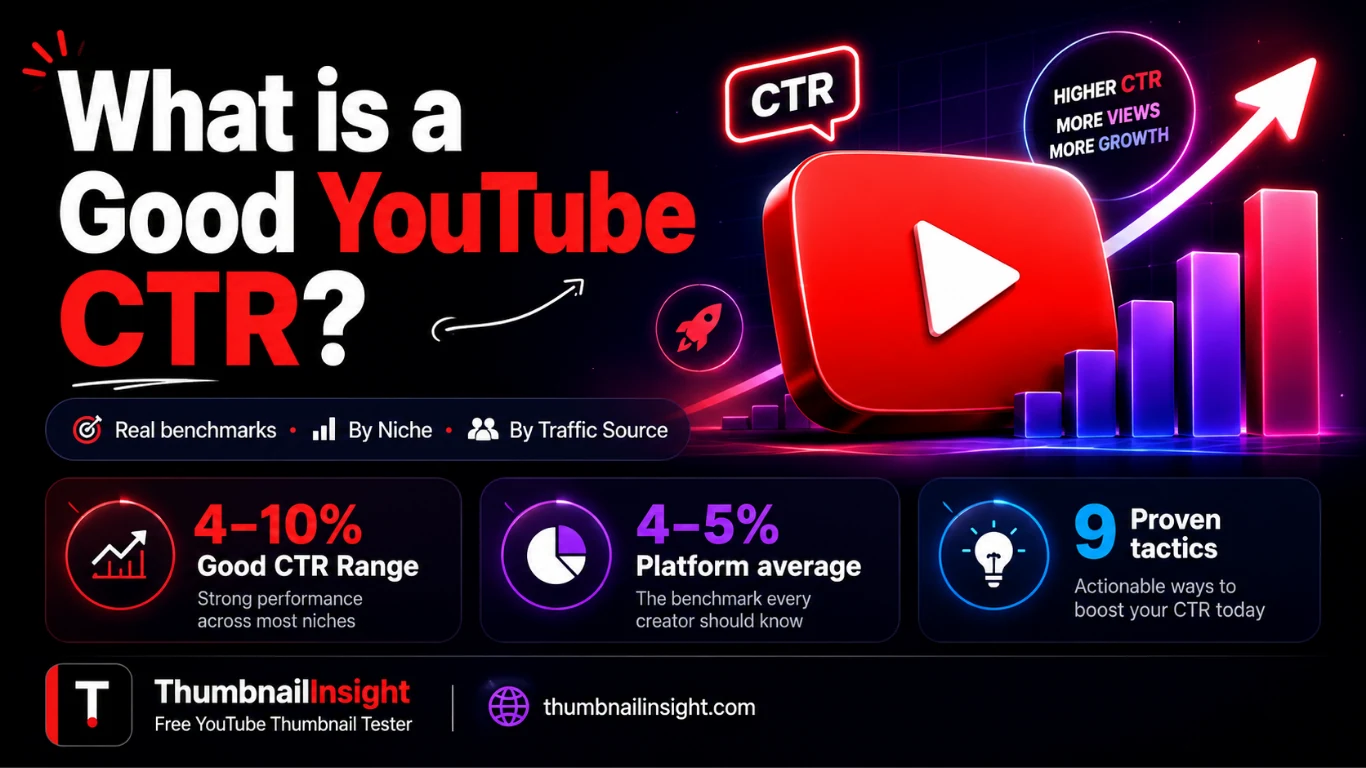
A good YouTube CTR sits between 4% and 10% for most creators, but that single number is almost useless without context, and obsessing over it the wrong way can actually tank your channel.
Here's the thing: YouTube CTR is one of those metrics that looks simple on the surface and turns into a rabbit hole the moment you try to benchmark it. A 3% CTR could be totally fine for a large educational channel getting millions of browse impressions. That same 3% would be a red flag for a brand-new channel still finding its footing. The number means different things depending on your niche, your traffic source, how old the video is, and, a newer wrinkle, what happens after someone clicks.
This guide gives you the real numbers, the context to read them correctly, and a set of tactics that actually move the needle. No filler.
What YouTube CTR Actually Means (And What It Doesn't)
YouTube defines CTR, or Impressions Click-Through Rate, as the percentage of times viewers clicked your video after it appeared as an impression on the platform. The formula is straightforward:
So if your video gets 10,000 impressions and 500 people click on it, your CTR is 5%.
What counts as an impression? Any time YouTube shows your thumbnail and title in a registered surface: the home feed, search results, suggested videos, or the subscription tab. Not every view generates an impression; someone who clicks a direct link from Twitter, for example, doesn't contribute to your impression CTR at all.
This distinction matters because creators often confuse overall views with impression-based performance. Your CTR lives in YouTube Studio → Analytics → Reach → Impressions click-through rate. That's the number we're talking about throughout this guide.
What CTR does not measure: content quality, production value, or how much your audience likes the video. CTR is entirely a measure of your packaging: your thumbnail and your title. Full stop. A brilliant video with a weak thumbnail will have a low CTR. A mediocre video with an irresistible thumbnail will have a high one. The algorithm doesn't know the difference until people start clicking (or bouncing).
What Is a Good YouTube CTR in 2026? The Benchmarks
The Platform-Wide Range
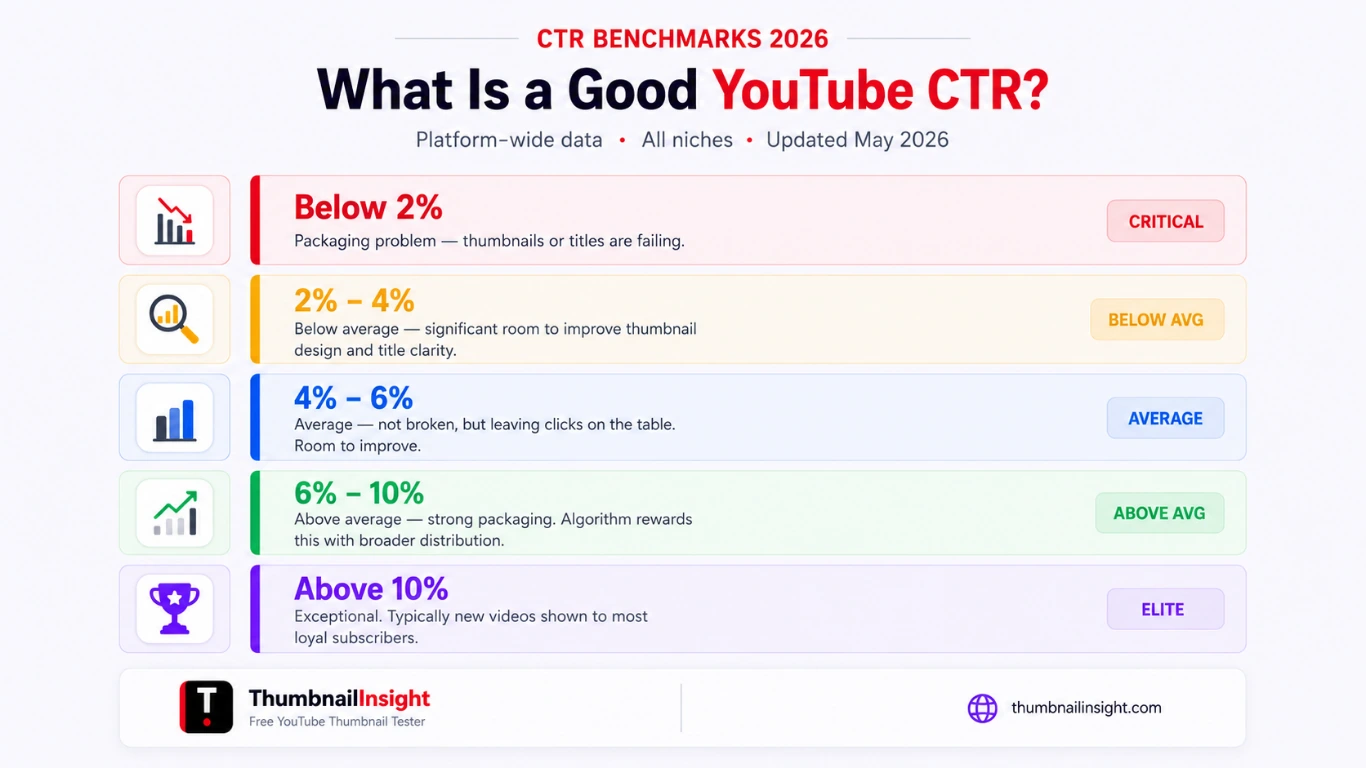
The clearest data available says: most channels fall between 2% and 10% CTR, with the platform-wide average clustering around 4% to 5%. YouTube itself has historically confirmed this range, and 2026 benchmark data holds it consistent.
Here's a practical interpretation grid:
| CTR Range | What It Means |
|---|---|
| Below 2% | Packaging problem. Thumbnails or titles are failing to connect with your audience. Immediate attention needed. |
| 2%–4% | Below average. Room for significant improvement, especially in thumbnail design and title clarity. |
| 4%–6% | Average. You're not broken, but you're leaving clicks on the table. |
| 6%–10% | Above average. Strong packaging. The algorithm will reward this with broader distribution. |
| Above 10% | Exceptional, typically seen in new videos shown to a channel's most loyal subscribers, or highly refined niches. |
If your channel sits at 4–5%, you're normal. That's not an excuse to settle there, but it does mean your titles and thumbnails aren't fundamentally broken.
CTR by Traffic Source (The Number That Actually Matters)
Your overall channel CTR is an average of very different numbers from very different contexts. Looking at aggregated CTR is like checking your average body temperature across all rooms in your house and the number hides what's actually happening.
YouTube Search CTR is the highest of any traffic source, typically running between 8% and 15% for well-optimized content. Viewers who search for something have high intent. They're looking for a specific answer, and if your title directly matches their query, they'll click.
Suggested Videos CTR falls in the 5%–10% range, with 2026 benchmarks placing the average around 9.5% for content with strong topical adjacency. These viewers just finished a related video. These viewers are warm, engaged, and looking for more. Context is already established.
Browse Features (Home Feed) CTR is typically the lowest, often between 2%–6%. The home feed shows your content to people who may not know you at all. Your thumbnail has to do all the work of generating curiosity from a cold start.
The diagnostic insight here: if your overall CTR is 5% but your search CTR is 12% and your browse CTR is 2%, you don't have a CTR problem. You have a browse packaging problem. The aggregated number hides the diagnosis. Break it down by source before you start making changes.
CTR by Niche
Different niches have structurally different CTR ceilings and floors. This is partly about audience behavior and partly about thumbnail conventions. Gaming audiences are trained to click on dramatic, character-focused thumbnails. Finance audiences respond to specificity and data. Educational content rewards clear, promise-based titles.
| Niche | Typical CTR Range | Notes |
|---|---|---|
| Gaming | 5%–12% | Highly visual audience, strong thumbnail culture |
| Finance / Investing | 4%–9% | Intent-driven searches, high specificity rewards |
| Education / How-To | 4%–8% | Clear value promise in title drives clicks |
| Lifestyle / Vlog | 3%–7% | Audience loyalty matters more than cold impressions |
| News / Commentary | 3%–8% | Timeliness is a major click trigger |
| Health & Fitness | 4%–9% | Transformation promises perform well |
| Tech Reviews | 4%–8% | Product-name searches have high CTR |
These are ranges, not ceilings. Channels within any niche can outperform their category by doing packaging better than the competition.
CTR by Channel Size and Video Age
New channels and new videos often spike in CTR during the first 24 to 48 hours. That's because YouTube initially shows the video to your most engaged subscribers: the people most likely to click on anything you post. As the video gets pushed to broader audiences through browse and suggested, CTR naturally drops because those viewers have no existing relationship with you.
This means comparing a brand new video's 8% CTR to a 6-month-old video's 3% CTR is a false comparison. A better benchmark is comparing similar videos in the same time window after publication.
The 2026 Game-Changer: Quality CTR
Here's what most CTR guides don't talk about yet. YouTube's algorithm in 2026 doesn't just look at whether people clicked; it looks at what happened in the first 30 seconds after they did.
This concept, increasingly referred to as "Quality CTR", means that high CTR paired with immediate drop-off is now a net negative signal. If viewers click your thumbnail and bail within seconds, YouTube reads that as a broken promise. The algorithm responds by pulling back distribution.
The practical implication: thumbnails and titles need to accurately represent the video, not just win the click. A misleading thumbnail that gets a 12% CTR will underperform a honest thumbnail with 6% CTR if the first group leaves immediately and the second group stays. Average viewer retention across YouTube is only 23.7%, with 55% of viewers leaving within the first 60 seconds which means the opening of your video is now part of your CTR strategy, not separate from it.
Design for the click. Deliver on the promise.
Myth vs. Fact (What People Get Wrong About YouTube CTR)
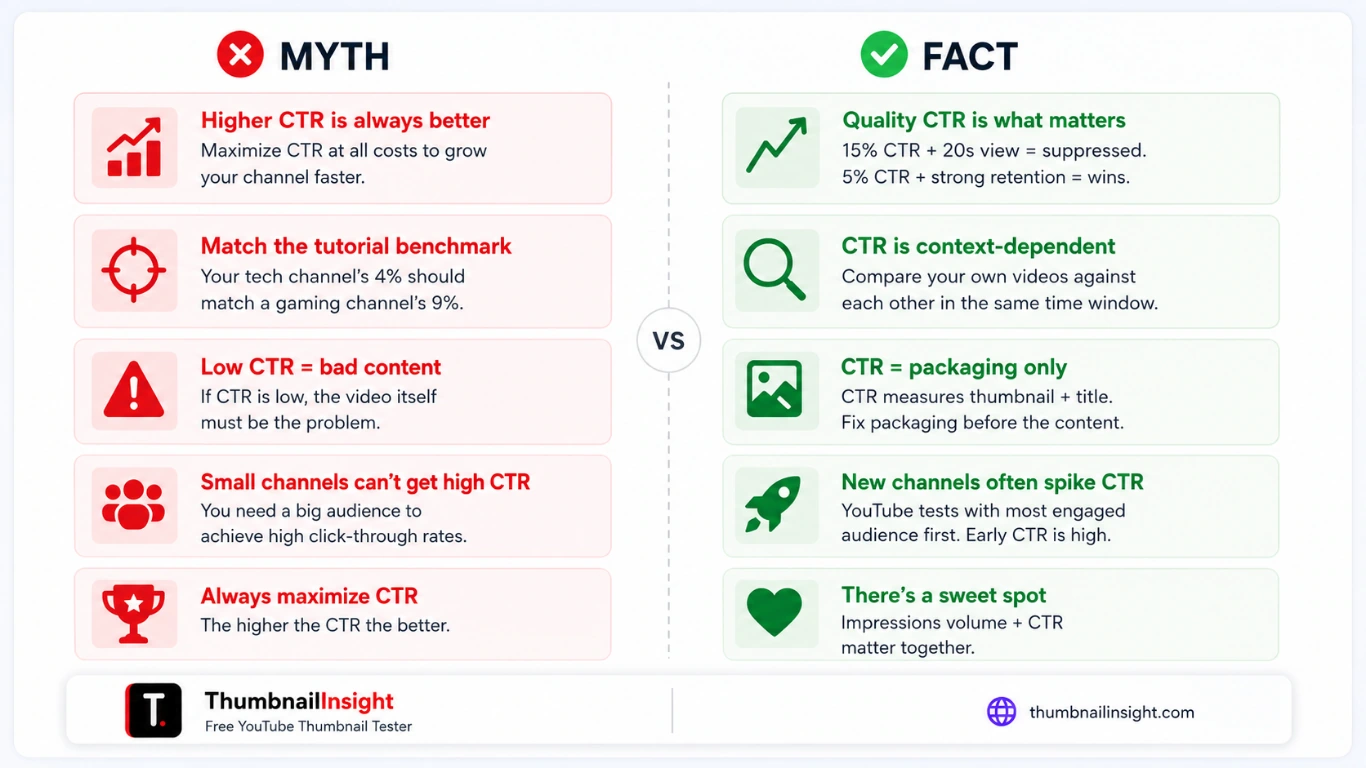
A higher CTR is always better.
Not if it's manufactured by a misleading thumbnail. Quality CTR (clicks followed by actual viewing) is what the algorithm rewards in 2026. A 15% CTR with a 20-second average view duration will get suppressed faster than a 5% CTR with strong retention.
My CTR should match what I saw in a YouTube tutorial.
CTR is context-dependent. Comparing your tech review channel's 4% CTR to a gaming channel's 9% CTR tells you nothing useful. Compare your own videos against each other, within the same time window.
A low CTR means my content is bad.
CTR measures thumbnail + title performance, not content quality. A great video with a weak thumbnail will have low CTR. Fix the packaging before concluding the content is the problem.
Small channels can't get high CTR.
New channels often have higher CTR in early impressions because YouTube tests content with the most engaged audience segment first. The challenge is sustaining that as distribution broadens.
You should always try to maximize CTR.
There's a sweet spot. Extremely high CTR on a video in a small niche might just mean YouTube is showing it to your 200 most loyal fans. Volume of impressions and conversion rate matter together.
9 Proven Ways to Improve Your YouTube CTR
You have roughly 0.5 seconds to communicate something compelling. The thumbnail needs to work at small sizes (mobile-first) and convey a clear emotional hook or curiosity gap without the viewer having to read the title. High-contrast colors, one dominant face or object, and minimal text win consistently. Ask yourself: does this thumbnail make someone stop scrolling even if they can't read the title?
- One clear focal point: face, object, or dramatic visual
- High contrast so it pops against YouTube's white/grey background
- Consistent visual branding so subscribers recognize you instantly
- Faces with strong emotion outperform text-heavy designs in most niches
A common mistake: the thumbnail shows a shocked face with "I LOST EVERYTHING" and the title says "I Lost Everything." You've just said the same thing twice. The thumbnail and title should work as a system, each adding a different piece of information that together creates irresistible curiosity.
Think of it as a relay race. The thumbnail creates intrigue. The title provides context or specificity. Together, they answer the viewer's implicit question: "What is this and why should I care?"
Search-driven CTR rewards titles that match what people are actually typing. But browse-driven CTR rewards titles that trigger emotion or curiosity in someone who wasn't looking for anything specific.
For search traffic: be specific, lead with the result or benefit. "How to Edit YouTube Videos in 20 Minutes (Beginner Tutorial)" outperforms "YouTube Video Editing for Beginners."
For browse traffic: create a knowledge gap. "The YouTube Strategy Nobody's Talking About in 2026" works better than "My YouTube Strategy."
Match your title approach to the traffic source you're optimizing for, and check your traffic mix in YouTube Studio to know which one matters more for each video.
Most creators pick one thumbnail and hope for the best. That's leaving a coin flip in the hands of your algorithm performance. Tools like ThumbnailInsight allow you to test multiple thumbnails after publishing and automatically deploy the winner.
Even without dedicated tools, you can manually swap thumbnails after 48 to 72 hours if initial CTR is underperforming. YouTube will re-evaluate the video's packaging and give it another push to test audiences.
Go into YouTube Studio and sort your videos by CTR. The top 20% and bottom 20% will teach you more about your audience than any blog post. What did the high-CTR videos have in common? Specific visual elements, title structure, emotional triggers? Reverse-engineer your own wins.
Also check: are your low-CTR videos getting many impressions? That's a packaging problem. Are they getting very few impressions? That might be a metadata or topic relevance issue; the algorithm isn't confident enough in who to show it to.
With Quality CTR in play, the first 30 seconds of your video directly influence how your packaging gets evaluated over time. If viewers consistently click and bounce, YouTube will stop recommending the video, and reduces distribution on your next videos.
Start with a hook that immediately delivers on the thumbnail's promise. Don't use a long intro, don't recap what the video is about, don't ask for likes and subscribes before you've given any value. Confirm the viewer made a good decision by clicking within the first 10 to 15 seconds.
Broad titles and vague thumbnails might seem like they'd appeal to more people. The opposite is usually true. A narrowly targeted title gets shown to people most likely to click it, generating a strong CTR signal. A generic title gets shown broadly, produces a weak signal, and gets suppressed.
Specificity is a feature, not a limitation.
Look at the top 5 videos in your niche on a given topic. If they all use red thumbnails with white text, try a dark blue thumbnail. If they all use question-mark titles, try a declarative statement. Pattern interruption catches the eye in a scroll-driven environment.
This doesn't mean be random. It means be deliberately different in a way that still communicates the video's core promise clearly.
Your old videos aren't dead if they still have search potential. Go through your back catalog and identify videos that:
- Get impressions but have CTR below your channel average
- Rank on page 1 of YouTube search but convert poorly
Redesign the thumbnail, update the title to be more specific or benefit-forward, and watch whether CTR and view velocity improve. This is one of the fastest ways to get more distribution from content you've already made.
How to Find Your CTR in YouTube Studio
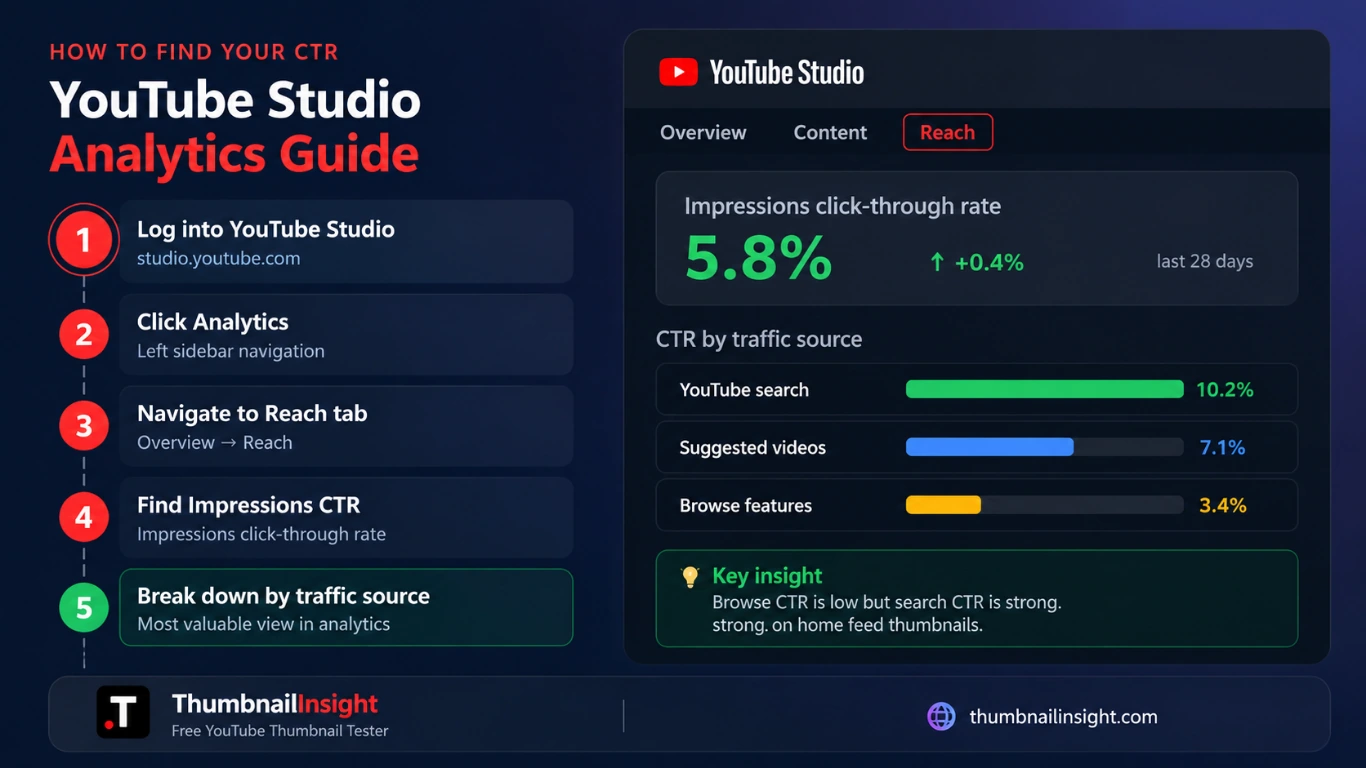
Compare your numbers against your own historical average before benchmarking against anyone else. Your channel's baseline is your real reference point.
What Years of Testing Actually Teaches You
After working with creators across niches, spanning 10K-subscriber educational channels to multi-million subscriber gaming operations, the pattern that shows up most often isn't bad content. It's a disconnect between the video's packaging and its delivery.
The channels that consistently maintain above-average CTR have one thing in common: they've closed the feedback loop. They watch where viewers drop off, they look at which thumbnails drive clicks and retention, and they treat every video as a data point for the next one. They don't obsess over platform-wide benchmarks. They obsess over improving their own channel's average by 0.5% per video.
One creator tested 6 thumbnail variations on the same video over 90 days. The winner: a simple, high-contrast image with one face and no text had a 47% higher CTR than the original thumbnail, which had been text-heavy and visually cluttered. The content was identical. The packaging was everything.
The second pattern: the channels that panic about a 3% CTR and try to manufacture clickbait to spike it. Short-term, it works. Medium-term, it destroys retention metrics, which tanks the algorithm's confidence in the channel, which reduces future distribution. Optimizing for CTR in isolation is a losing game. Optimizing for CTR as part of a packaging-to-retention system is how you actually win.
FAQ: YouTube CTR Questions Answered
Conclusion
YouTube CTR is simpler than most creators make it and more nuanced than any single benchmark number suggests. The platform average of 4%–5% gives you a sanity check, not a target. Your niche, your traffic source mix, and your channel's own historical baseline are the real benchmarks that matter.
The most important shift heading into 2026: CTR doesn't live in isolation anymore. Quality CTR, meaning the combination of whether people click and whether they stay, is now what the algorithm actually rewards. Optimize your packaging to win the click and deliver on the promise within the first 30 seconds. That loop is the whole game.
What to do next:
- Open YouTube Studio and find your CTR by traffic source; not just your overall number.
- Identify the 3 videos with the lowest browse CTR and redesign their thumbnails using the principles above.
- Check retention on your 3 highest-CTR videos. If retention drops sharply at the 30-second mark, your packaging is overpromising; adjust your titles and thumbnails to be more honest and specific.
- Run a thumbnail A/B test on your next video upload.
Small, consistent packaging improvements compound. A channel that improves CTR by 1 percentage point across its top 20 videos doesn't just get more clicks; it signals the algorithm that the channel's content is worth distributing more broadly. That's how channels grow.
Last updated: May 2026. CTR benchmarks are sourced from YouTube's own documentation, 2025–2026 creator research reports, and aggregated channel analytics data across multiple niches.
Test your thumbnail before it costs you clicks
Preview across 7 YouTube layouts, check contrast, mobile legibility, and get a full CTR score. Free, no account needed.
Test your thumbnail free →