Testing your YouTube thumbnail before uploading is the single step that separates creators who grow from creators who guess. You can spend three hours designing the perfect thumbnail (right colors, right face, right text) and still lose clicks because the text becomes unreadable at mobile size, or because the contrast vanishes on a phone screen at midnight. Most creators find out after publishing. By then, it is already too late.
In 2026, over 70% of YouTube views come from mobile devices. Your thumbnail is not being judged on a 27-inch desktop monitor. It is being judged on a 6-inch screen, in a fast-moving feed, by a viewer who will spend less than two seconds deciding whether to click. If you have never previewed your thumbnail the way your actual audience sees it, you are flying blind.
This guide covers everything you need to know about testing your YouTube thumbnail before it goes live, the tools to use, the layouts to check, the metrics that matter, and the mistakes to fix before they cost you clicks.
Why Testing Your Thumbnail Before Upload Actually Matters
Here is the uncomfortable truth: YouTube does not show your thumbnail the same way in every placement. A thumbnail that looks sharp in your design tool may look cluttered in search results, invisible on mobile, and completely unrecognizable in bell notifications.
According to Backlinko's 2025 study, videos with custom thumbnails see 35% higher CTR than those with auto-generated ones. But a poorly tested custom thumbnail can actually underperform an auto-generated one. Bad contrast, wrong sizing, and unreadable text all tank your click-through rate before your video ever gets a fair chance.
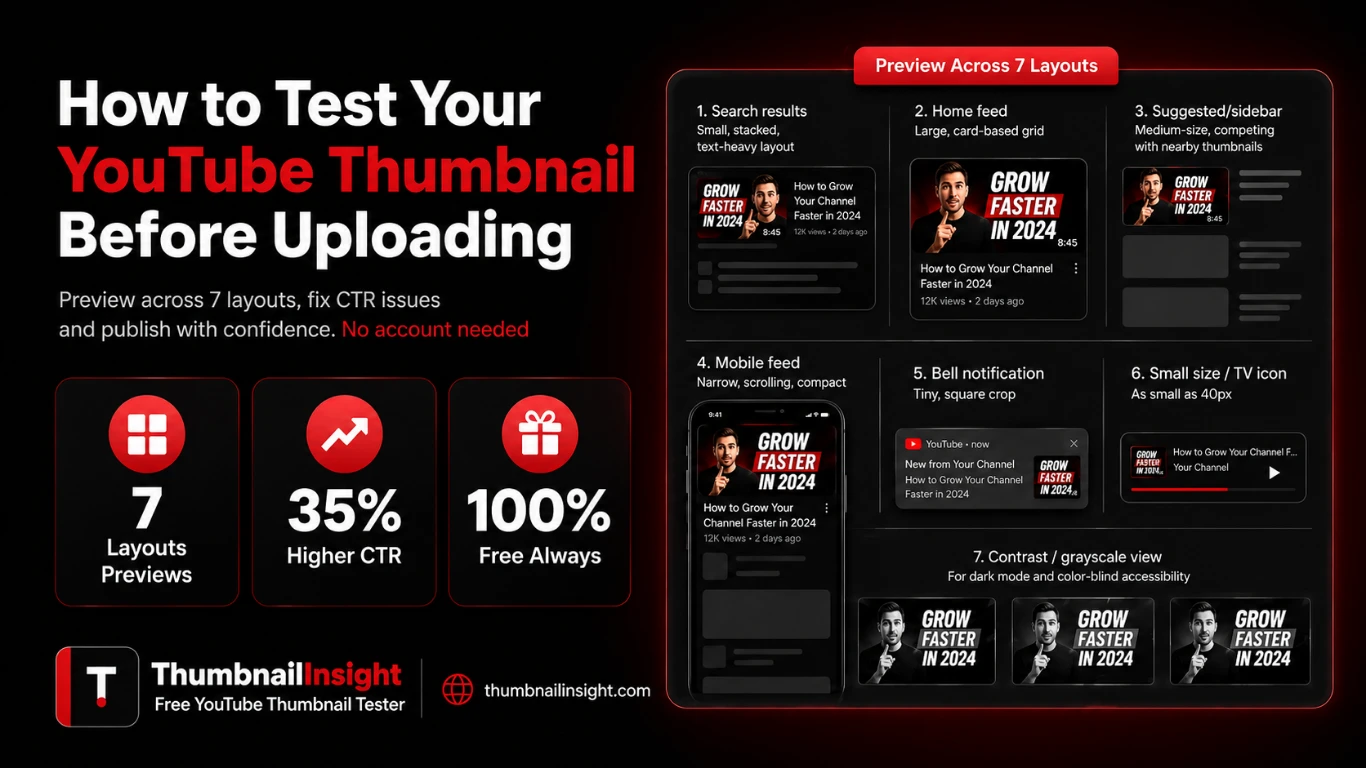
YouTube shows thumbnails in at least seven different contexts:
- Search results: small, stacked, text-heavy layout
- Home feed: large, card-based grid
- Suggested/sidebar: medium-size, competing with nearby thumbnails
- Mobile feed: narrow, scrolling, compact
- Bell notification: tiny, square crop
- Small size / TV icon: as small as 40px
- Contrast / grayscale view: for dark mode and color-blind accessibility
Every one of these surfaces renders your thumbnail differently. Testing before you upload means you catch problems while you can still fix them, not after your video has already been served to thousands of impressions with a broken design.
What Happens When You Upload Without Testing
Most creators who skip thumbnail testing experience the same patterns.
- They publish.
- The video gets some impressions.
- CTR is low.
They assume the topic was not interesting. They move on. The real culprit is a thumbnail that looked fine in Canva and terrible in a mobile feed and never gets identified.
Some specific problems that only appear at preview:
- Text cut-off: words that sit perfectly on a 1280×720 canvas get cropped by YouTube's interface overlays, especially the video duration badge in the bottom-right corner
- Face unrecognizable at mobile scale: a thumbnail with a small face looks fine at full size and becomes a blurry blur at 120px on mobile
- Contrast collapse: colors that pop on a white background disappear on dark mode or a dark-themed feed
- Notification preview failure: the bell notification crops your thumbnail to a tight square, often cutting the most important visual element
None of these problems are visible in your design software. They only show up when you see your thumbnail inside an actual YouTube layout. That is exactly what a thumbnail tester is built to show you.
How to Test Your YouTube Thumbnail Before Uploading: Step by Step
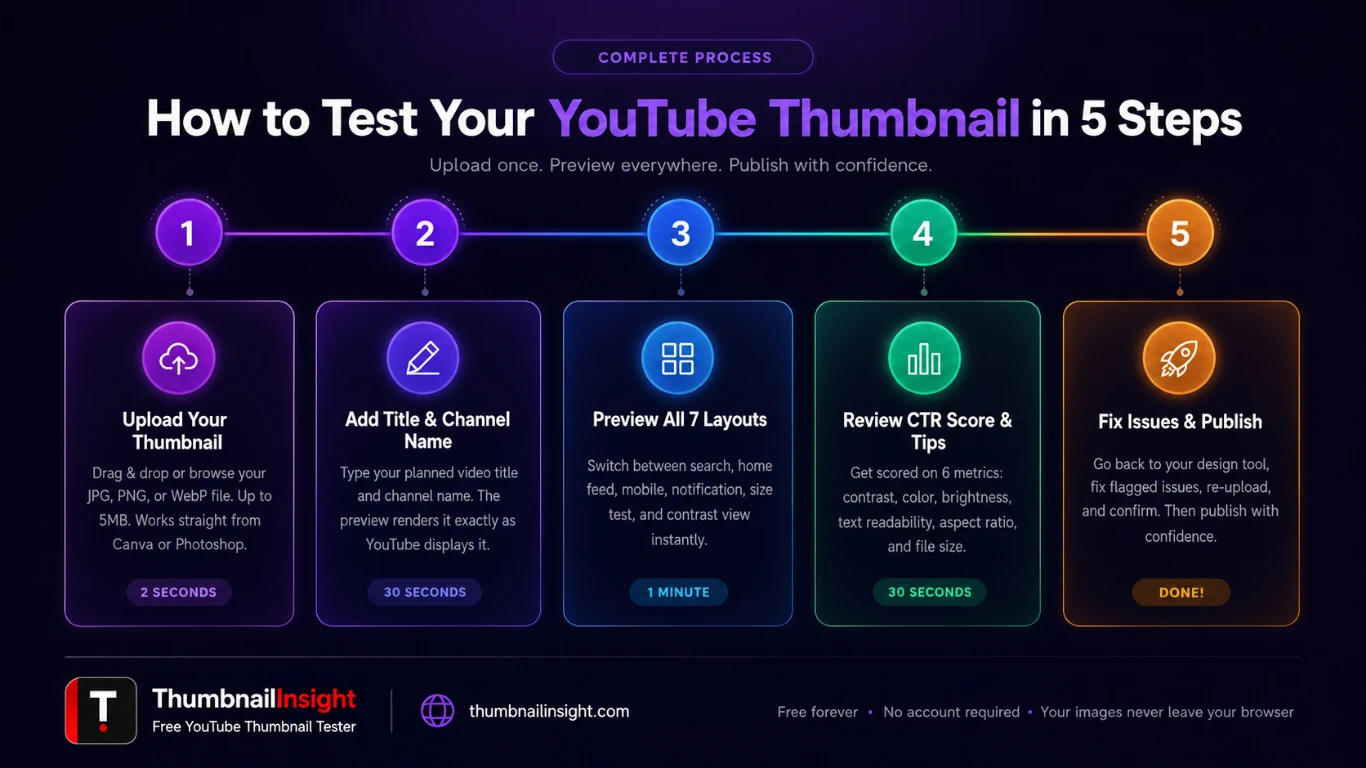
Testing your thumbnail takes under two minutes. Here is exactly how to do it using ThumbnailInsight, a free thumbnail tester that requires no account, no signup, and stores nothing.
Go to ThumbnailInsight and drag your thumbnail file into the upload area, or click to browse. The tool accepts JPG, PNG, and WebP files up to 5MB. The recommended size is 1280×720 pixels at a 16:9 aspect ratio. This is the same specs YouTube requires.
Type the exact title you plan to use for the video. This matters because the preview renders your title next to the thumbnail exactly as YouTube would display it including upload time, view count, and channel name. A title that is too long truncates in certain layouts. You will see this immediately.
Switch between each layout tab:
- Search: how your thumbnail appears in YouTube search results
- Home feed: the large-card grid on YouTube's homepage
- Suggested: the sidebar panel next to a video being watched
- Mobile: how it looks in the YouTube mobile app feed
- Notification: the bell notification crop on mobile lock screens
- Size test: your thumbnail rendered at 4 real YouTube sizes (from 168px down to 40px)
- Contrast: grayscale and high-contrast modes to check color-independent legibility
ThumbnailInsight scores your thumbnail across six metrics: contrast, color saturation, brightness, text readability, aspect ratio accuracy, and file size. Each is scored out of 100. You get a combined CTR score and specific, actionable improvement tips based on what is actually wrong.
Go back to your design tool, fix the flagged issues, export again, and re-upload to the tester. Repeat until the preview looks strong across all seven layouts. Then publish with confidence.
The 7 Layouts You Must Check (And What to Look for in Each)
| Layout | What to check | Common failure |
|---|---|---|
| Search results | Is text readable at this smaller size? | Text too small, too much text |
| Home feed | Does it stand out next to neighboring thumbnails? | Low contrast, bland colors |
| Suggested sidebar | Is the focal point visible when cropped narrower? | Subject pushed to edges |
| Mobile feed | Can you read the text at arm's length on a phone? | Font too small, face too small |
| Bell notification | Does the main element survive a square crop? | Subject cut off entirely |
| Size test (40px) | Is there any recognizable element at icon size? | All detail lost, unreadable |
Myth vs. Fact: YouTube Thumbnail Testing
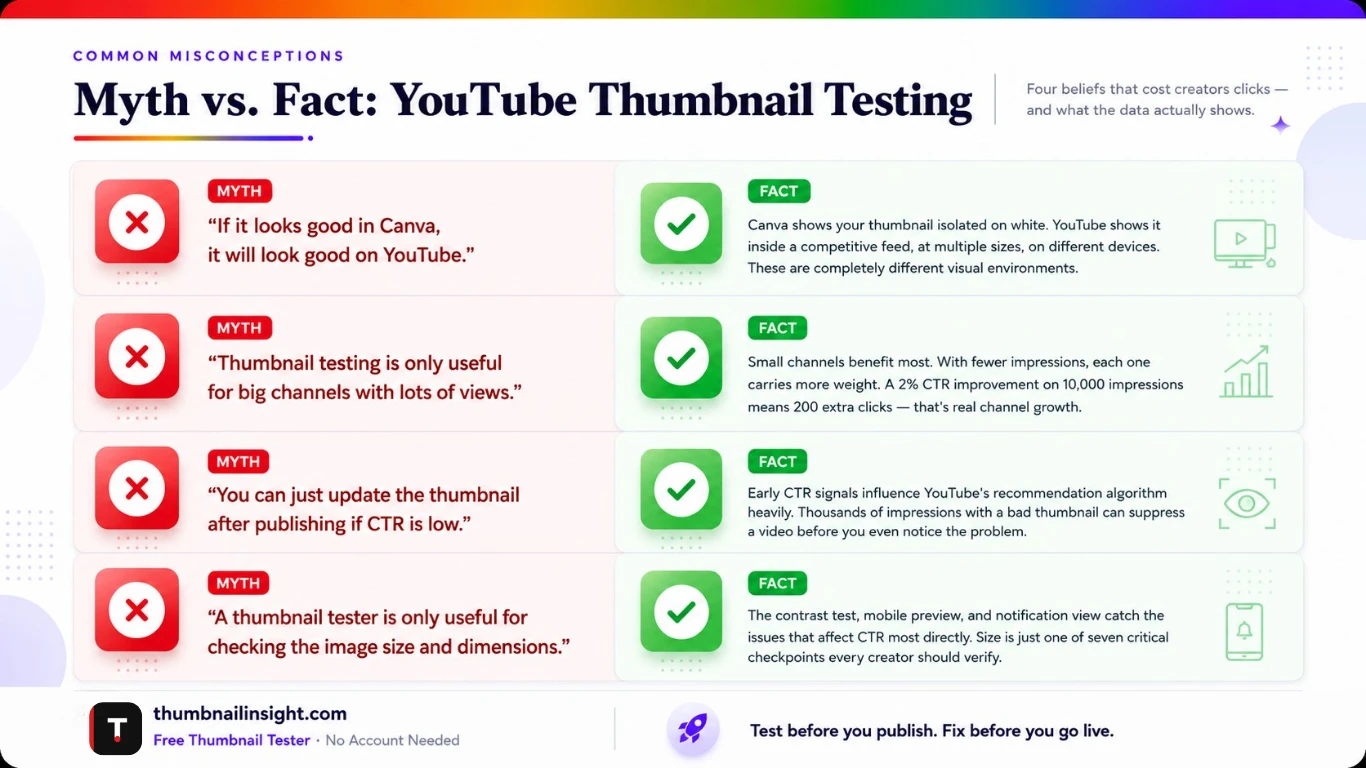
If it looks good in Canva, it will look good on YouTube.
Canva shows your thumbnail in isolation on a white background. YouTube shows it inside a competitive feed, at multiple sizes, on different devices, next to other thumbnails. These are completely different visual environments.
Testing thumbnails is only for big channels.
Small channels benefit most. When you have fewer impressions, each one matters more. A 2% CTR improvement on 10,000 impressions is an extra 200 clicks. Testing is more valuable, not less, when your audience is still small.
You can just update the thumbnail after publishing if it performs badly.
You can, but by then YouTube has already served thousands of impressions with the old thumbnail. Early CTR signals influence how aggressively YouTube recommends your video. Starting with a tested thumbnail gives you the best possible first impression with the algorithm.
A thumbnail tester is only useful for the size check.
The contrast test, mobile preview, and notification view catch the problems that affect CTR most directly. Size is just one of seven critical checkpoints.
What a Good CTR Looks Like in 2026
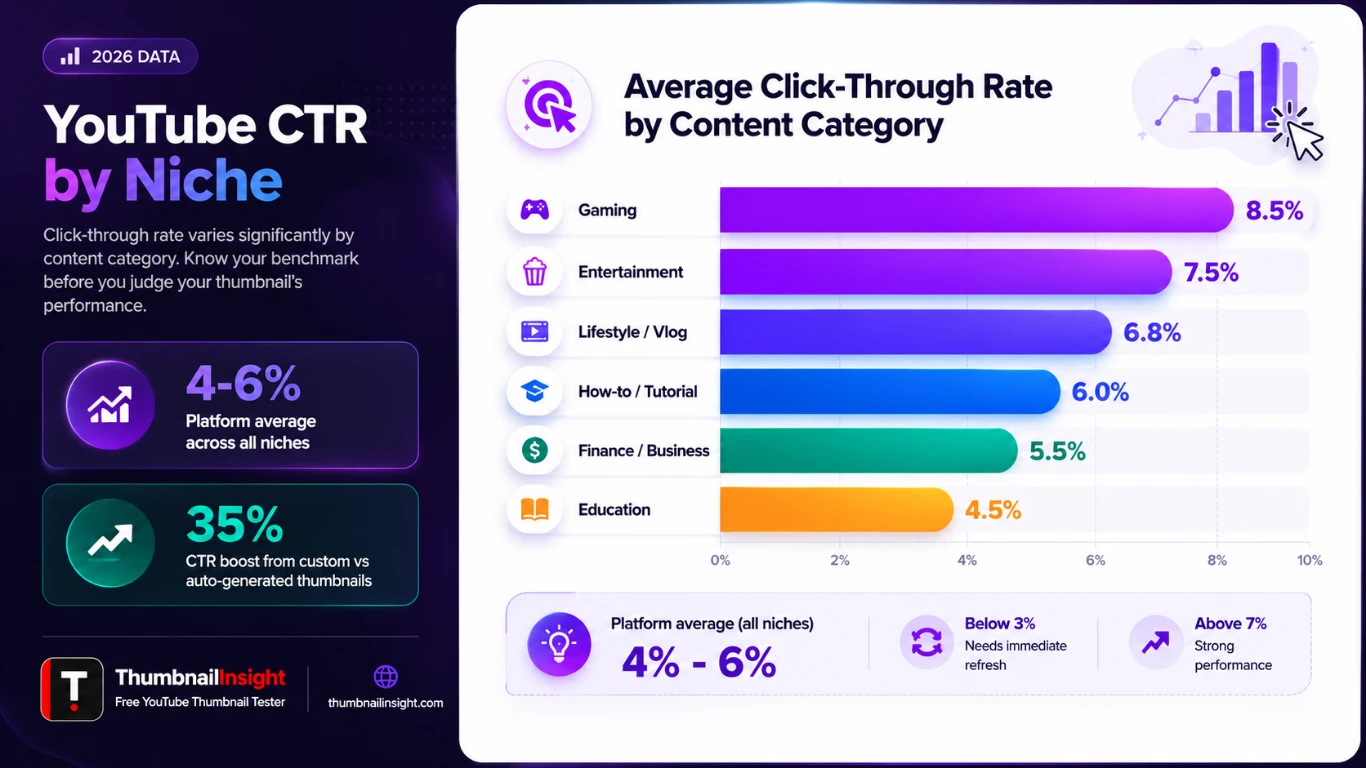
Not every niche performs the same. Here is a breakdown of median CTR benchmarks by content category, based on 2025-2026 data from Focus Digital and Miraflow:
| Niche | Average CTR | Benchmark |
|---|---|---|
| Gaming | 8.5% | |
| Entertainment / Lifestyle | 6–8% | |
| How-to / Tutorial | 5–7% | |
| Finance | 5–6% | |
| Educational | 4.5% | |
| All channels (platform average) | 4–6% |
A CTR below 3% typically indicates the thumbnail or title needs a significant refresh. Anything above 7% in most niches is performing well. Above 10% is exceptional and usually the result of deliberate thumbnail testing and iteration, not luck.
The Design Elements That Most Affect CTR
Testing reveals problems. But it helps to know what to design for in the first place. Based on 2025-2026 research and analysis of high-performing thumbnails across niches, these are the elements that drive the biggest CTR improvements:
Emotional faces with clear expressions: Thumbnails featuring human faces with expressive emotions (surprise, concern, excitement, determination) increase CTR by 20–30% compared to neutral expressions. The face must be large enough to register at mobile scale. If it is smaller than about 30% of the thumbnail height, it effectively disappears on a phone screen.
High contrast between subject and background: The brain processes color contrast before it processes detail. A bright subject on a busy background loses the viewer's eye immediately. High-performing thumbnails almost always separate the focal point from the background with a strong color or luminosity difference.
3 to 5 words of text maximum: Testing data from 2026 shows that thumbnails with 3–5 words of text achieve the highest CTR. Once text hits 6 words, performance measurably drops. The rule is not about characters, it is about cognitive load. Viewers scanning a feed at speed will not stop to read a sentence. They will stop for a short, punchy phrase that raises a question or promises a benefit.
Colors that pop against YouTube's interface: YouTube's homepage is predominantly white and light gray. Warm colors (red, orange, yellow) naturally contrast against this background and draw the eye. High-contrast color combinations (red and white, yellow and black, blue and orange) consistently outperform muted palettes. The contrast test in a thumbnail tester shows you exactly whether your thumbnail has this quality.
Free vs. Paid Thumbnail Testing Tools: How They Compare
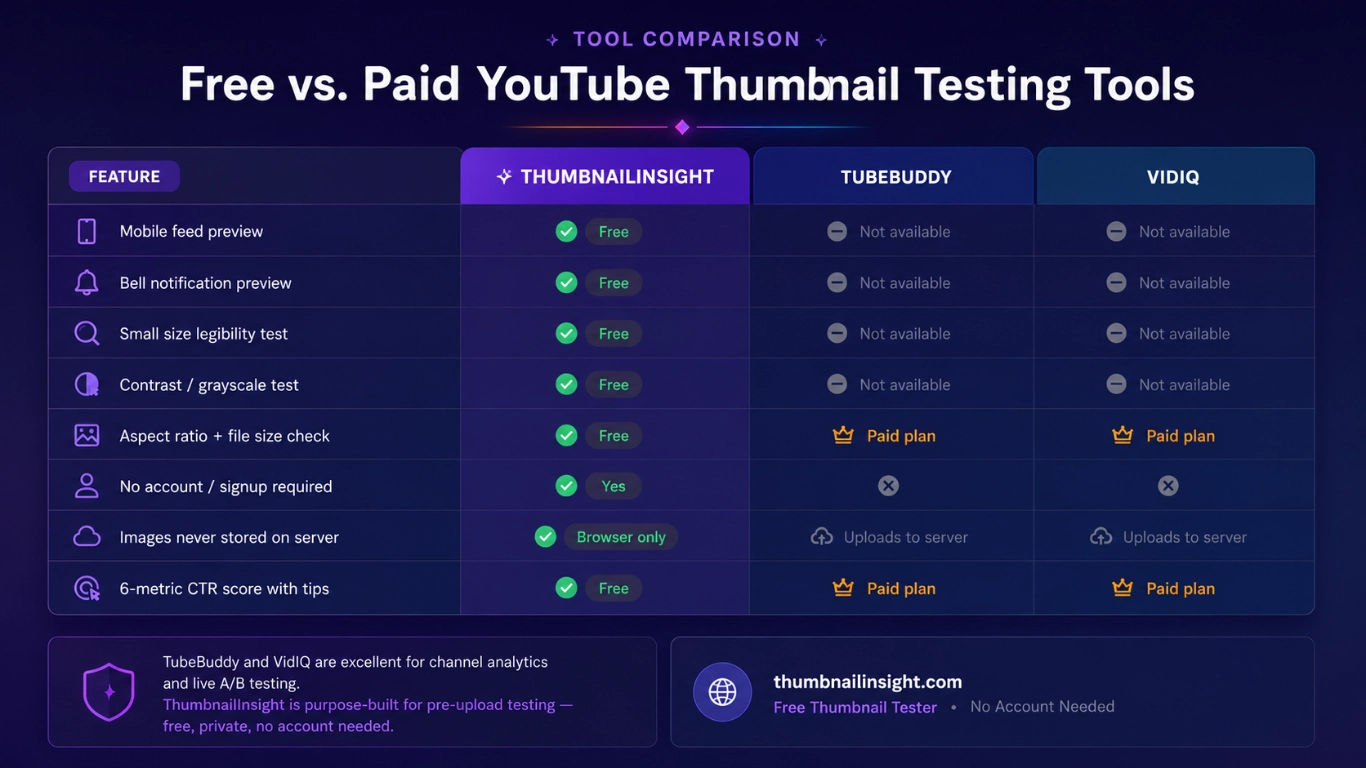
| Feature | ThumbnailInsight | TubeBuddy | VidIQ |
|---|---|---|---|
| Mobile feed preview | ✓ Free | Not available | Not available |
| Bell notification preview | ✓ Free | Not available | Not available |
| Small size legibility test | ✓ Free | Not available | Not available |
| Contrast / grayscale test | ✓ Free | Not available | Not available |
| Aspect ratio + file size check | ✓ Free | Paid plan | Paid plan |
| No signup required | ✓ Yes | Account required | Account required |
| Images stored on server | ✓ Never | Uploaded to server | Uploaded to server |
| CTR score with tips | ✓ Free | Paid | Paid |
TubeBuddy and VidIQ are excellent tools for channel analytics, keyword research, and A/B testing live videos. But for pre-upload thumbnail testing particularly mobile, notification, and contrast previews they require paid subscriptions or do not offer these features at all. ThumbnailInsight was built specifically for the pre-upload testing step, and it is free with no account required.
From Experience Working with Creators
After working with hundreds of YouTube creators and analyzing thousands of thumbnails across niches (from gaming to finance to food) the most common and costly mistake is not bad design. It is a good design that was never tested at scale.
A thumbnail that a creator spent two hours perfecting in Canva at full 1280×720 resolution looks completely different when rendered at 120px in a mobile feed. The text becomes a blur. The face becomes a smudge. The carefully chosen color palette becomes indistinguishable from the surrounding thumbnails.
The creators who consistently achieve above-average CTR are not always the best designers. They are the most systematic testers. They preview before they publish. They check on their mobile. They check contrast. They update old thumbnails on underperforming videos and watch CTR recover. Testing is not a nice-to-have for serious creators. It is the single highest-leverage activity in thumbnail optimization.
The two minutes you spend testing before upload are worth more than ten hours of redesigning after a video underperforms.
Frequently Asked Questions
Conclusion
Testing your YouTube thumbnail before uploading is not a complicated process. It is a two-minute habit that consistently separates high-CTR creators from those who publish and hope. The tools exist, they are free, and the feedback is immediate.
In 2026, YouTube's algorithm is more competitive than ever. Half a billion videos are competing for attention across a platform where viewers make click decisions in under two seconds. Your thumbnail is not just an image, it is the first signal your video sends. The mobile feed, the notification preview, and the contrast test are not optional checks. They are the difference between a video that gets recommended and one that fades.
Preview before you publish. Fix before you go live. Then let the algorithm do its job.
Ready to test your thumbnail?
Upload yours free at ThumbnailInsight. No account needed, results in under two seconds.
Test your thumbnail free →